
Core Movement & Controls
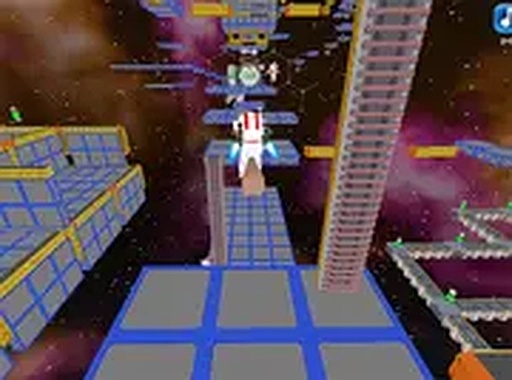
Zero-G Platform Runner centers on a simple but satisfying control scheme: a single tap or click activates the character's jetpack, propelling them upward. The challenge lies in judging the correct amount of lift needed to land safely on nearby platforms. Because the station has broken apart, each jump requires careful timing and spatial awareness. The controls are responsive on both touchscreens and mouse inputs, making the game accessible on any device.
Station Layout & Exploration
The game world is a derelict space station that has fractured into many floating segments. Each segment presents a unique arrangement of platforms, gaps, and collectibles. Players must navigate these segments in a specific order, as collecting a certain number of energy cells is required to unlock the next area. This creates a natural progression where each new zone feels like a reward for mastering the previous one. The visual design uses starry backgrounds and drifting debris to reinforce the sense of being in zero gravity.
Difficulty & Learning Curve
The game is designed to be forgiving for newcomers while still offering a satisfying challenge for experienced players. Early sections feature wide platforms and generous landing zones, allowing players to get comfortable with the jetpack controls. Later sections introduce narrower platforms and wider gaps, demanding more precise jumps. Because there are no timers or enemies, players can take as long as they need to study each layout before attempting a crossing. This approach encourages experimentation and learning from mistakes without frustration.
Technical Accessibility
Zero-G Platform Runner runs entirely within a web browser, requiring no installation or account creation. It is optimized for both mobile and desktop screens, with a full-screen mode available for a more immersive view. The game saves progress locally, so returning players can continue from where they left off. These technical choices make it easy to pick up for a few minutes or settle into a longer session.



Comments
0 comments